
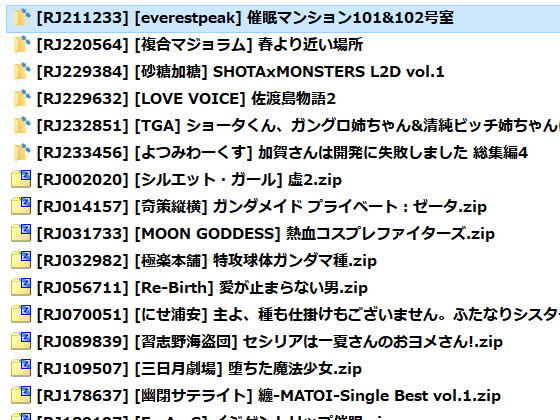

Synopsis
A convenient software that automatically names files and folders from DLsite works with circle names, titles, and other metadata.
Simply launch the software and drag-and-drop your work files and folders using your mouse.
You can also rename multiple items at once. Select multiple files and folders from your PC (Explorer or My Computer) and drag-and-drop them all together.
The software is designed to be easy and intuitive to use.
Thank you for your support.
Editorial Review
This isn’t an adult game or visual novel—it’s a Windows utility designed to solve a genuinely practical problem within the doujin community, and that requires a different critical lens entirely.
The work occupies an unusual niche: infrastructure software for collectors and enthusiasts. Rather than narrative, aesthetics, or sexual content, the value proposition centers on time-savings and organizational efficiency. For anyone maintaining a substantial DLsite library, the friction of manual file naming across hundreds of titles represents real friction. Batch renaming using circle names, work titles, and metadata addresses this directly, and the drag-and-drop interface lowers the barrier to adoption compared to command-line alternatives or spreadsheet workflows that plague many collectors.
What distinguishes this from generic file-management tools is the DLsite-specific focus. The software appears to parse metadata native to DLsite’s structure, meaning it understands the ecosystem in ways a generic renaming utility simply doesn’t. For users juggling multiple circles, publication dates, and content categories across their collection, this targeted approach matters. The emphasis on intuitive design—mouse-based interaction, multi-item selection, visual feedback—suggests attention to usability rather than power-user complexity.
The audience here is explicit: mid-to-serious DLsite collectors on Windows who’ve accumulated enough works to justify automation. This skews toward organized enthusiasts rather than casual browsers, and particularly toward those frustrated by existing solutions.
Whether this tool justifies its place depends entirely on your collection size and tolerance for manual organization. For anyone managing fifty-plus titles, the time reclaimed makes this a pragmatic investment. For casual users with a dozen favorites, it’s overkill. It’s not entertainment—it’s infrastructure, and it executes that mission competently.
Interested? Get the free trial here ↓
This Week’s Top Rankings:
Related Tags:
adult | male-oriented | doujin | R18 Games
![[Smartphone] Ona Kura Maid Life – Resort Service with Class Gal Maids](https://henhenta.com/wp-content/uploads/2026/10/RJ01526338-300x225.jpg)
![[Smartphone Version] [Complete Edition] Rico’s Mysterious Errands](https://henhenta.com/wp-content/uploads/2026/10/RJ01682354-300x225.jpg)

![Survival is Impossible [Henrikusto Ryutsu Center]](https://henhenta.com/wp-content/uploads/2026/10/RJ01755000-300x225.jpg)