

Synopsis
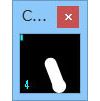
A spinner that rotates when you run browsers, games, and other applications.
The heavier the load on your computer, the faster it spins.
Get an intuitive understanding of your PC’s current processing load.
Editorial Review
This sits at the intersection of novelty utility and adult game culture—a desktop accessory designed to visualize system load through kinetic feedback rather than conventional performance monitoring. It’s a genuinely niche proposition: the adult tag positions it within the doujin ecosystem despite lacking narrative or sexual content, suggesting this is either categorized for audience targeting or represents the creator’s way of reaching the adult game community specifically.
What distinguishes this from standard system monitoring software is its visual-tactile approach. Rather than pulling up Task Manager or relying on abstract percentage readouts, users get a real-time physical representation of CPU/GPU strain through rotational speed. The spinner mechanic transforms an invisible computational process into something tangible and oddly meditative to observe. For those who enjoy watching performance metrics—a surprisingly engaged audience among PC enthusiasts and streamers—this delivers exactly that sensation in minimalist form. The “heavier load, faster spin” scaling creates intuitive feedback that makes system stress immediately legible at a glance.
The accessory tag and utility classification confirm this is software-driven rather than a physical object, though the naming suggests aspirational physicality. The male audience specification points toward streamers, competitive gamers, and PC builders who monitor system performance as part of their workflow, though the novelty appeal extends to anyone who finds desktop customization oddly satisfying.
This works best for users who want ambient performance awareness without invasive overlay notifications, or who simply enjoy watching their rig struggle under load. It’s a low-friction entry point for system monitoring that rewards attention without demanding it. For anyone seeking practical performance tools, dedicated monitoring software offers more control; this trades precision for aesthetic appeal and conceptual charm.
A charmingly absurdist take on system utilities that delivers genuine value to its narrow but engaged target.
Interested? Get the free trial here ↓
This Week’s Top Rankings:
Related Tags:
![[Smartphone] Ona Kura Maid Life – Resort Service with Class Gal Maids](https://henhenta.com/wp-content/uploads/2026/10/RJ01526338-300x225.jpg)
![[Smartphone Version] [Complete Edition] Rico’s Mysterious Errands](https://henhenta.com/wp-content/uploads/2026/10/RJ01682354-300x225.jpg)

![Survival is Impossible [Henrikusto Ryutsu Center]](https://henhenta.com/wp-content/uploads/2026/10/RJ01755000-300x225.jpg)